The Gann Fan is one of those technical analysis tools that many traders recognize, but not everyone knows how to use with a clear method. Most traders place the fan on a chart, look at the diagonal lines and wait for price to react somewhere around them. The problem is that, when used that way, the Gann Fan can become too subjective.
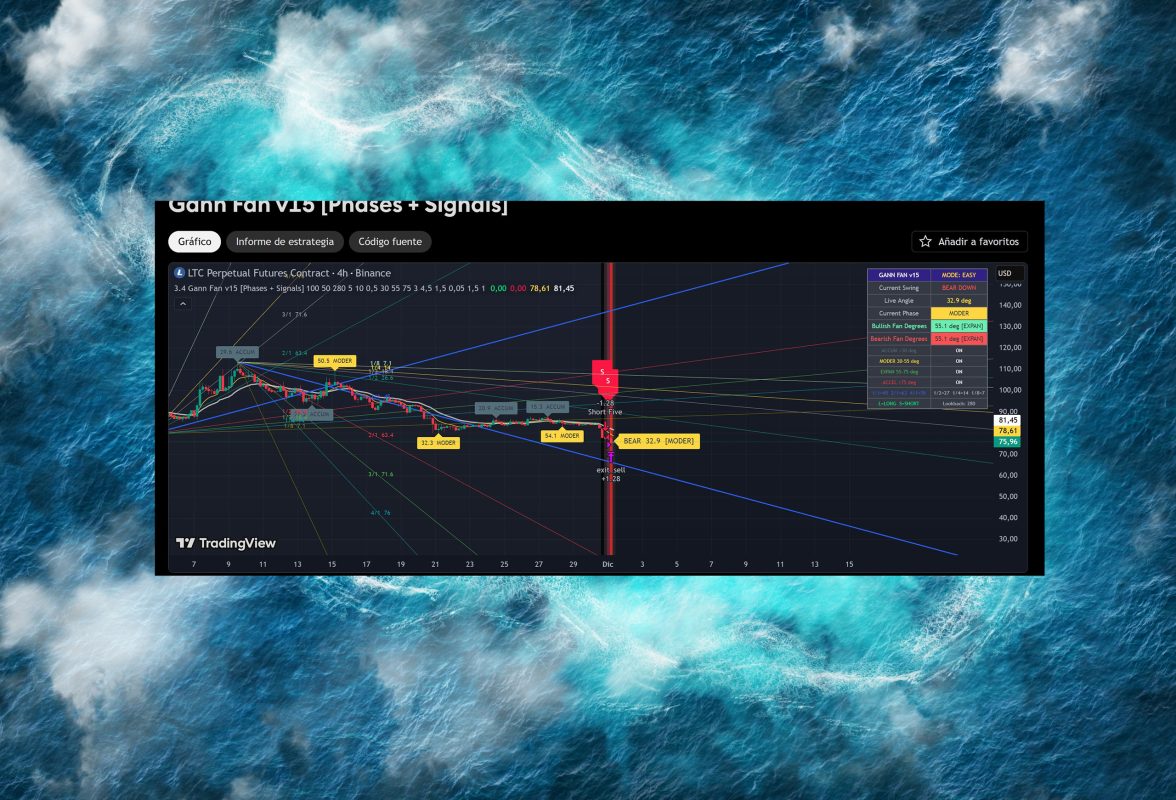
That is why I developed Gann Fan v15 [Phases + Signals], my own TradingView script designed to turn the classic Gann Fan concept into a more structured visual strategy. It does not only draw fan lines. It also reads market strength through angles, classifies market phases, displays LONG and SHORT signals and includes risk management tools.
The original TradingView URL for the script is:
https://es.tradingview.com/script/A8gB4ha7
This code is my own work and was created for traders who want a clearer way to analyze the market using Gann Fan, Gann angles, pivots, EMAs, LONG/SHORT signals, take profit and stop loss.
What is the Gann Fan and why is it still useful in trading?
The Gann Fan is a technical analysis tool based on angular lines drawn from an important price point. That point can be a major low, a major high or an area where price started a strong movement.
The main idea is to study how price moves in relation to time. Instead of only asking whether price is going up or down, the Gann Fan helps traders observe the speed and strength of the movement.
When price stays above certain angles, it can suggest strength. When price loses those levels, it can suggest weakness, exhaustion or a change in momentum. That is why the Gann Fan can be used as a dynamic support, dynamic resistance and trend structure tool.
However, the traditional Gann Fan has one major problem: it often depends too much on visual interpretation. Two traders can place the fan in different locations and get different readings. This is where a TradingView strategy can make the analysis clearer.
Why create a Gann Fan strategy in TradingView?
TradingView makes it possible to turn a visual idea into a rule-based strategy. That is the difference between simply looking at a chart and having a system with defined conditions.
In the case of Gann Fan v15, the goal was to take the classic Gann Fan concept and combine it with modern technical filters. The script works with pivots, angles, market phases, EMAs, visual signals and risk management.
The code is built in Pine Script v6 and runs as a strategy on the chart. It includes fan color settings, labels, phase calculation, EMA 8 and EMA 21, LONG/SHORT signals, stop loss, take profit, trailing stop and optional open profit protection.
The purpose is not just to make the chart look better. The goal is to help traders answer more practical questions:
Is the market accumulating or expanding?
Does the move have enough strength?
Does the current trend favor long or short positions?
Is there confirmation from moving averages?
Is the entry supported by a defined stop loss and take profit?
How Gann Fan v15 works
Gann Fan v15 [Phases + Signals] is based on a phase-reading model. Instead of seeing the market only as bullish or bearish, the script classifies the movement according to angle strength.
The main phases are:
ACCUM: accumulation or low-strength movement.
MODER: moderate movement with possible directional intention.
EXPAN: expansion with stronger directional force.
ACCEL: acceleration of the movement.
This classification helps the trader avoid relying only on one fan line. The script attempts to show whether price is gaining speed, losing strength or entering a stronger momentum phase.
The strategy also calculates angles using ATR, which helps adapt the reading to the volatility of the asset. This matters because not every market moves the same way. A cryptocurrency, a forex pair, a stock and an index can all behave very differently.
Remember to practise good risk management when trading and use Monte Carlo trading
LONG and SHORT signals in the strategy
One of the most important features of the script is the visual signal system.
When the system detects a potential bullish opportunity, it displays a LONG signal. When it detects a potential bearish opportunity, it displays a SHORT signal.
These signals are not random. The script considers several technical factors:
The direction of the current swing.
The current market phase.
The calculated angle.
The relationship between EMA 8 and EMA 21.
Candle confirmation.
The selected entry mode.
This makes the strategy more complete than a basic Gann Fan. It is not just about price touching a line. It is about having a combination of technical conditions.
The three entry modes: Strict, Medium and Easy
The script allows traders to choose between three entry modes. This is useful because not every trader wants the same type of signal. Some traders prefer fewer signals with stronger filters. Others prefer more opportunities and accept more noise.
Strict Mode
Strict Mode is the most selective mode. It looks for entries when the market moves from a weaker phase into expansion or acceleration.
For a LONG signal, the strategy looks for bullish structure, a strength transition, EMA 8 above EMA 21 and a bullish candle.
For a SHORT signal, it looks for bearish structure, EMA 8 below EMA 21 and a bearish candle.
This mode can be useful for traders who prefer waiting for stronger confirmation.
Medium Mode
Medium Mode is a balance between confirmation and signal frequency. It allows entries when the market is in MODER, EXPAN or ACCEL phases, as long as direction and confirmation conditions are also present.
It can be useful for traders who want more trades than Strict Mode, but without using the most aggressive setting.
Easy Mode
Easy Mode is the most flexible mode. It can generate more signals because it activates when the angle is above the minimum configured threshold and price confirms with EMA and candle direction.
This mode can be useful for testing, fast markets or traders who prefer earlier entries. However, it requires more discipline because it can generate more false signals in sideways markets.
Built-in risk management: TP, SL and trailing stop
A strong trading strategy should not only focus on entries. It also needs clear exit logic.
The script allows traders to configure:
Percentage stop loss: to limit potential losses.
Percentage take profit: to define a target.
Trailing stop: to help protect favorable moves.
Open profit protection: to close trades when a configured profit level is reached.
Visual TP and SL lines: to see exit levels directly on the chart.
This is important because a good entry can lose value without a clear exit plan. In trading, risk management is not optional. It is part of the strategy.
Difference between this script and a traditional Gann Fan
A traditional Gann Fan is a drawing tool. The trader must decide where to place it, how to read it and when to take a trade.
Gann Fan v15 goes further because it turns the analysis into a structured trading model.
The main differences are:
It draws the Gann Fan dynamically.
It calculates movement angles.
It classifies market phases.
It displays LONG and SHORT signals.
It uses EMAs as a trend filter.
It includes a visual dashboard.
It allows stricter or more flexible entries.
It includes take profit, stop loss, trailing stop and profit protection.
This makes it more useful for traders who want a visual tool, but also want clearer rules.
Gann Fan indicator
Gann Fan strategy
Gann Fan TradingView
How to use Gann Fan v15 in TradingView
To use the strategy, open TradingView and load the script from the original URL:
https://es.tradingview.com/script/A8gB4ha7
Then apply it to the asset you want to analyze. It can be tested on forex, crypto, stocks, indices or futures, depending on your market.
A practical starting process would be:
Start with Medium Mode.
Observe how LONG and SHORT signals behave.
Check whether the asset respects the market phases.
Adjust stop loss and take profit based on volatility.
Test different timeframes.
Run backtesting before using it in live trading.
Not every asset reacts the same way. That is why the strategy should be tested across different markets and timeframes before making real trading decisions.
Gann Fan in forex: how to apply it to currency markets
The Gann Fan in forex trading can be useful because currency pairs often move through impulses, pullbacks and structure breaks. Pairs such as EUR/USD, GBP/USD, USD/JPY or USD/MXN may show movements where angles help traders read trend strength.
In forex, the Gann Fan can be used to:
Detect dynamic support areas.
Identify diagonal resistance zones.
Measure trend weakness.
Look for continuation after a pullback.
Analyze changes in price speed.
With Gann Fan v15, this reading is supported by phases and signals, which may help reduce subjectivity. Even so, forex traders should also consider liquidity sessions, economic news and spreads.
Where can I buy a Gann Fan for trading?
Many traders search for “where to buy a Gann Fan for trading,” but the Gann Fan is usually not a physical product. It is commonly included as a charting tool inside trading and analysis platforms.
Some platforms already include a basic Gann Fan drawing tool. However, having a drawing tool is different from having a strategy with signals, phases and risk management.
If you are looking for a more advanced TradingView tool, you can check Gann Fan v15 [Phases + Signals] at the original TradingView URL:
https://es.tradingview.com/script/A8gB4ha7
Best apps and platforms that include Gann Fan tools
Several platforms offer Gann Fan tools or advanced technical analysis features. Some of the most common options include TradingView, MetaTrader, broker platforms and professional charting software.
For beginners, TradingView is often a practical choice because it includes charts, indicators, drawing tools, alerts and custom Pine Script strategies.
The advantage of a custom script like Gann Fan v15 is that you do not rely only on manually drawn lines. You can analyze phases, signals and risk levels directly on the chart.
Software comparison for beginner traders using Gann Fan
If you are a beginner, you do not need to start with complicated software. The best option is usually a platform that lets you clearly see price action, test tools and understand market behavior.
TradingView is a strong option for beginners because it is visual, easy to use and supports indicators, alerts, strategies and custom scripts.
MetaTrader is also popular, especially in forex, although customizing tools can require more technical knowledge.
Broker platforms may include basic tools, but they are often more limited for advanced technical analysis.
In this context, TradingView has an important advantage: it allows traders to create and share scripts like Gann Fan v15, where Gann Fan analysis is combined with signals and clearer rules.
Advantages of Gann Fan v15
The main advantages of this strategy are:
It analyzes the market with angles and phases.
It reduces the subjectivity of the traditional Gann Fan.
It displays visual LONG and SHORT signals.
It includes EMA 8 and EMA 21 confirmation.
It offers three entry modes.
It includes take profit, stop loss and trailing stop.
It provides a dashboard for market interpretation.
It can be tested across different assets and timeframes.
Important limitations
Although the strategy can be useful, no indicator guarantees results. Markets can change, become sideways, generate false signals or react to unexpected news.
That is why it is important to run backtesting, forward testing and adjust the settings according to the asset before using the strategy with real capital.
The Gann Fan can help read price structure, but it should not replace risk management or trading discipline.
Conclusion
The Gann Fan remains an interesting tool for analyzing the relationship between price, time and trend strength. However, its traditional use can be subjective when there is no clear method.
Gann Fan v15 [Phases + Signals] aims to solve that problem by turning the Gann Fan into a more structured TradingView strategy. By combining angles, market phases, EMAs, LONG/SHORT signals, dashboard visualization, stop loss, take profit and trailing stop, it offers a more complete way to study potential trading opportunities.
This script is my own work and the original TradingView URL is:
https://es.tradingview.com/script/A8gB4ha7
Like any trading strategy, it should be tested before being used in live markets. But if you are looking for a clearer way to apply the Gann Fan in TradingView, this tool may be a useful alternative for analyzing trends, impulses and changes in market strength.
FAQ about Gann Fan and Gann Fan v15
How does a Gann Fan work in technical analysis?
A Gann Fan works by projecting angular lines from an important high or low on the chart. These lines help traders study the relationship between price and time. In technical analysis, they can be used as dynamic support, dynamic resistance or references for trend strength.
What is a Gann Fan and how is it used in trading?
A Gann Fan is a technical analysis tool made of multiple diagonal lines. Traders use it to identify possible areas where price may react. It can help analyze trend continuation, weakness, pullbacks and potential breakouts.
Where can I buy a Gann Fan for trading?
You usually do not need to buy a physical Gann Fan. It is normally included as a drawing tool in charting platforms such as TradingView. If you want a more complete version with signals and strategy logic, you can check Gann Fan v15 [Phases + Signals] on TradingView.
What is the difference between a normal Gann Fan and Gann Fan v15?
A normal Gann Fan is a drawing tool. Gann Fan v15 is a TradingView strategy that includes Gann Fan lines, angle calculation, market phases, LONG/SHORT signals, EMAs, dashboard, take profit, stop loss and trailing stop.
Can Gann Fan v15 be used for forex trading?
Yes. It can be tested on currency pairs such as EUR/USD, GBP/USD, USD/JPY or USD/MXN. However, each pair has different volatility and behavior, so backtesting is recommended before using it in live trading.
How can I apply the Gann Fan to forex markets?
First, identify a relevant high or low. Then observe how price interacts with the Gann Fan lines. With a more complete strategy like Gann Fan v15, this reading can be combined with market phases, EMAs, LONG/SHORT signals and risk management.
Which apps include Gann Fan tools?
Some trading and charting platforms include Gann Fan tools, including TradingView, MetaTrader and certain broker platforms. TradingView is especially useful because it supports both drawing tools and custom Pine Script strategies.
What is the best software with Gann Fan for beginner traders?
For beginners, TradingView can be a good choice because it is visual, user-friendly and supports indicators, strategies, alerts and custom scripts. It also allows users to publish and test tools like Gann Fan v15.
Does Gann Fan v15 provide buy and sell signals?
Yes. The script displays LONG signals for potential bullish entries and SHORT signals for potential bearish entries. These signals are based on market phases, angles, swing direction, EMAs and candle confirmation.
Does the Gann Fan guarantee profits?
No. No indicator or strategy guarantees profits. The Gann Fan can help analyze the market, but it should always be used with risk management, testing and trading discipline.
What do ACCUM, MODER, EXPAN and ACCEL mean?
They are market phases used by the script to interpret movement strength. ACCUM represents low strength or accumulation, MODER indicates moderate movement, EXPAN shows expansion and ACCEL represents strong acceleration.
Can I use Gann Fan v15 for crypto trading?
Yes. It can be tested on cryptocurrencies, stocks, forex, indices or futures. In highly volatile markets, it is important to adjust the stop loss, take profit and timeframe.
Does Gann Fan v15 include stop loss and take profit?
Yes. The strategy includes configurable stop loss, take profit, trailing stop and optional open profit protection. It also draws visual TP and SL levels on the chart.

